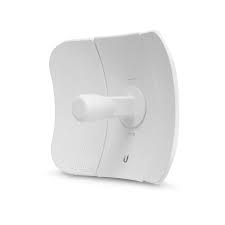
The Ubiquiti LiteBeam 5AC Gen2 (LBE-5AC-Gen2) is a lightweight and high-performance 5 GHz outdoor wireless bridge built for long-range point-to-point links. It provides strong and stable wireless coverage between buildings, offices, campuses, farms, and remote sites where wired connections are too costly or hard to install. With focused signal design and airMAX AC speed, the LiteBeam 5AC Gen2 delivers fast internet and data links over long distances with low interference.
Key Features
5 GHz airMAX AC radio for faster data throughput
High-gain directional antenna for long-range links
Ultra-lightweight build for easy outdoor setup
Weather-resistant design for all-weather use
AirOS software for wireless control and tuning
Gigabit Ethernet with passive PoE for power and data over one cable
Simple mounting hardware for quick installation
Specifications
The LiteBeam 5AC Gen2 features a 5 GHz airMAX AC radio and high-gain directional antenna to support long-distance wireless connections. It includes a Gigabit Ethernet port that carries both power and data using passive PoE. The device runs Ubiquiti’s AirOS, which lets you adjust wireless channels, SSID, security, and other settings easily. Its focused design helps send and receive strong signals over long distances.
How to Configure
Setting up the LiteBeam 5AC Gen2 is easy with the AirOS web interface. First, mount the device outdoors with the included hardware. Next, connect it to power and your network using the PoE adapter. Open a web browser and log in to AirOS. Then choose “Point-to-Point” mode, enter your Wi-Fi name (SSID) and password, and aim the unit toward the other device for the best signal. Finally, save your settings and test the link to ensure a strong connection.
Why Choose Ubiquiti LiteBeam 5AC Gen2
Choose the LiteBeam 5AC Gen2 if you need reliable long-range wireless connectivity with simple setup and strong performance. It delivers focused signal strength, low interference, and durable outdoor design at an affordable price. Moreover, airMAX AC technology improves throughput and reduces latency. Finally, it is ideal for ISPs, businesses, campuses, and remote areas where cable networks are not practical.
Reviews
There are no reviews yet.
Be the first to review “Ubiquiti LiteBeam 5AC Gen2”Cancel Reply



Reviews
There are no reviews yet.