
Description
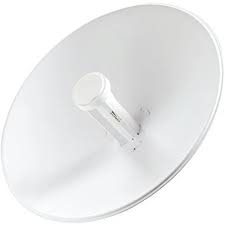
Ubiquiti PowerBeam M5-400 (PBE-M5-400)
The Ubiquiti PowerBeam M5-400 (PBE-M5-400) is a high-performance outdoor wireless bridge designed to connect two locations without cables. It works on the 5 GHz frequency band and uses a 25 dBi high-gain directional dish antenna to send strong radio signals over long distances — often over 25 km in clear line-of-sight conditions. This makes it a great choice for creating point-to-point (PtP) links between buildings, remote sites, or network nodes where laying cables is costly or impractical. The PowerBeam delivers reliable connectivity with real-world speeds of 150 Mbps or more, even in challenging environments.
Key Features
Long-range point-to-point wireless bridge for outdoor networks
5 GHz frequency with high-gain 25 dBi directional antenna
150+ Mbps real throughput for video, data, and voice traffic
Passive PoE support for easy power and data over one cable
Rugged weatherproof design with high wind survivability
UV-stable outdoor casing for harsh conditions
Pole-mount kit included for quick installation
Specifications
Model: PBE-M5-400
Frequency: 5 GHz (5170–5875 MHz)
Antenna Gain: 25 dBi directional dish
Throughput: 150+ Mbps typical
Range: Up to 25+ km line-of-sight
Network Port: 1 × Gigabit Ethernet (10/100/1000)
Power: Passive PoE 24 V (PoE injector included)
Power Consumption: ~8 W
Wind Survivability: 200 km/h
Operating Temp.: –40 °C to 70 °C
Mounting: Pole mount kit included
How to Configure
Mount the PowerBeam on a pole or tower with a clear line of sight to the other site.
Connect the Ethernet cable from the PoE injector to the PowerBeam’s network port.
Connect the PoE injector to your router or network switch.
Access the PowerBeam’s web interface using its IP address from a PC.
Set the mode to bridge or station depending on the link type.
Align the dish toward the target site and adjust for the strongest signal.
Save the settings and test the link — you should see the devices connect with strong signal strength.
Why Choose Ubiquiti PowerBeam M5-400 (PBE-M5-400)
Choose the Ubiquiti PowerBeam M5-400 if you need a long-distance wireless link with reliable performance, especially where cables are not possible or too expensive. Its powerful 25 dBi antenna and focused directional design help concentrate the signal for stable connectivity over many kilometers. Passive PoE support simplifies installation by using one cable for both power and data. The rugged outdoor design lets the device withstand harsh weather conditions, making it a strong choice for enterprise networks, remote site links, and rural broadband projects.
Reviews
There are no reviews yet.